

Make family time an opportunity to play and talk about online life. This guide offers twelve practical activities using simple materials, with scenarios and questions that help children explain their choices and practise digital safety skills.
Family games for online safety: start with one activity tonight
Imagine your child receives a message in a game: “Claim your prize now—send the code you just received.” They may have heard “keep your information private,” but still need a chance to practise the decision: pause, understand the request and choose someone who can help. A calm family activity can rehearse that moment without using real accounts or suspicious links.
This guide brings together twelve games you can make mainly with paper, pens and envelopes. Each creates room for conversation about privacy, scams, chat, kindness and asking for help. The activities are original editorial suggestions for home practice, rather than a test of a child’s ability or a programme with independently established prevention outcomes.
eSafety encourages families to take an interest in children’s gaming. Playing or watching with curiosity can help parents understand the experience. Its play-based resources also offer ways to open conversations about safety, kindness, choices and help. The original games below turn those broad principles into situations families can discuss together.
Five rules for a useful family game session
Use fictional information. Never write down real passwords, private addresses or account details, and do not test real scam links.
Reward the explanation. “I would ask Dad because the message asks me to keep a secret” tells you more than a quick guess.
Let mistakes open a conversation. Ask what might happen next and let players change their minds.
Join in yourself. An adult can say, “I missed that clue; I will check again.” Everyone can practise checking.
Adapt the activity. The suggested times are practical estimates, not fixed developmental rules. Read cards aloud, use drawings and follow your child’s comfort and abilities.
There is no need to finish every activity in one session. Pick one, then ask: “If this happened in real life, what would our next safe step be?”
Choose a game for your family’s goal
Goal | Games | What to notice |
|---|---|---|
Privacy and permission | 1, 4 and 10 | The child explains what to share, why and with whom |
Pausing and checking | 2, 8 and 9 | They look for evidence and resist urgency |
Account protection | 3 | They understand unique secrets and sign-in codes |
Relationships and help | 5, 6 and 7 | They identify support and a helpful response |
Family connection and review | 11 and 12 | They explain a choice in a new situation |
1. The secrets box: what can I share, and with whom?
Time and materials: About ten minutes, three envelopes and small cards. Label the envelopes “Usually OK to share,” “It depends” and “Protect it and ask an adult.”
How to play: Write fictional examples: a favourite colour, school name, password, photo of a friend, verification code or hobby. Each player chooses an envelope and explains their reasoning. A photo or hobby may belong in different places depending on the audience and context. Explore the difference rather than forcing one answer for every situation.
Ask: “Is telling a parent or doctor the same as posting to a public group?” Practise considering the information, recipient and purpose. Passwords and sign-in codes should not be sent to another player or someone asking for them in chat.
2. Message detective: which clue means pause?
Time and materials: Ten to fifteen minutes and three home-written messages with no active links.
How to play: Try “You won a prize—send your sign-in code now,” “Team practice is tomorrow—confirm with your coach using the number you know,” and “It’s your friend; I changed my number and need money.” A logo or polished writing does not prove a message is genuine. Ask the child what they know, what needs checking and which familiar, independent channel they could use.
Practise: Do not click to discover whether something is dangerous. Pause, check and ask an adult. If information was already shared, respond calmly and work on protecting the account rather than blaming the child.
3. The fictional password workshop
Time and materials: Ten minutes and cards with unrelated words or symbols.
How to play: Create imaginary paper accounts. Compare a short, predictable secret with a long, unique one made from random words or generated appropriately. Discuss why using the same password everywhere creates a problem. Do not ask for a child’s existing password; every example must be fictional and unused.
With an adult: Review an appropriate password manager, account recovery and multifactor authentication where available. CISA recommends long, random, unique passwords alongside a password manager and additional authentication. Protecting an account does not mean revealing a secret to someone offering to “test” its strength.
4. The “May I post this photo?” card
Time and materials: Ten minutes and drawings or pictures of objects, rather than private images of people.
How to play: Pretend someone has taken a family picture. Before “posting” it on a paper board, the player asks everyone involved. A person may refuse, request a crop or suggest a different audience. Then introduce a card saying, “Someone copied the image.” Discuss why deleting a post does not guarantee every copy disappears.
Practise: Ask permission, respect refusal and consider what a background, location or school uniform reveals. Do not use the activity to pressure a child into agreeing to a real photo. Respecting their answer is part of the lesson.
5. Chat theatre: how can I refuse a worrying request?
Time and materials: About fifteen minutes and fictional dialogue cards.
How to play: An adult acts out a request such as “Move to a private chat and don’t tell anyone,” or “Send a photo and I will give you a gift.” The child can choose a reply or decide not to answer, then explain how they would leave and tell an adult. Swap roles and try more than one situation.
Focus on behaviour: Pressure and harm can also come from someone a child knows. Discuss imposed secrecy, pressure, private information and discomfort instead of assuming only strangers present a risk. Avoid intense threats or reenacting a personal harmful experience.
6. The help map: who can I turn to?
Time and materials: Ten minutes and a sheet for drawing a support circle.
How to play: The child names trusted, reachable adults, perhaps a parent, teacher or responsible relative. Try “The first person is busy—what next?” Rehearse a sentence: “Something happened online and I need help, even if I made a mistake.”
The adult practises too: “Thank you for telling me. We will work out what happened and what to do next.” Do not promise absolute secrecy; protecting a child may require further support. Promise to listen and not blame them for asking for help.
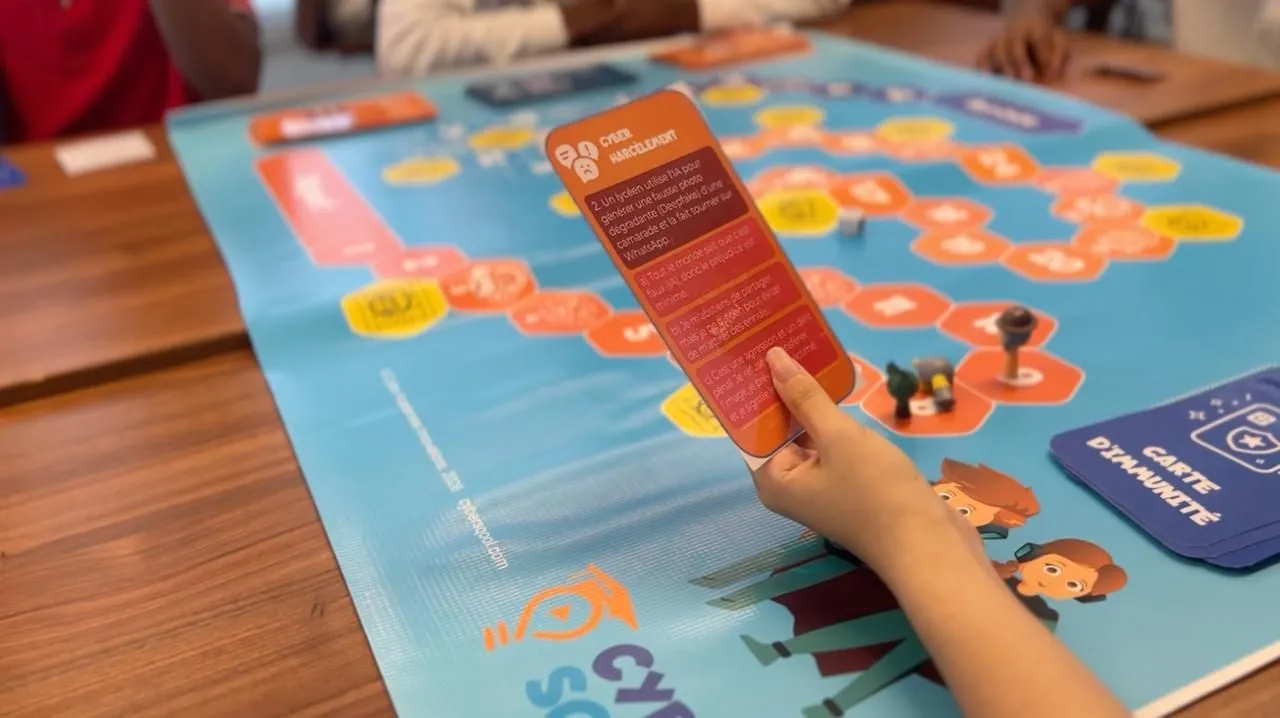
From Cyber Sqool’s activity materials: a scenario card opens a conversation about the next response. The home games in this guide are independent suggestions using simple materials.
7. The kindness ladder: what if a group mocks someone?
Time and materials: Ten minutes and cards labelled “Adds harm,” “Helps” and “Needs adult support.”
How to play: Present a fictional group sharing a mocking drawing. Discuss possible actions: forwarding it, posting an angry reply, not joining in, privately supporting the child or telling a responsible adult. Explore how “just joking” can become harmful when it spreads or continues.
Practise: Do not make a child confront an abusive group alone. They can stop sharing, support the person affected and seek adult help. If a real experience comes up, stop the activity and listen privately instead of turning the disclosure into a group discussion.
8. Before sharing: do we know the source?
Time and materials: Fifteen minutes and two fictional news items clearly labelled as practice examples.
How to play: Put an eye-catching headline without a source beside a story with an identifiable publisher and date. Before “forwarding,” each player asks one question: who said it, when, where is the evidence, and is the image from the same event? Do not rely on one visual clue to detect a fake; check the source, context and an independent trusted source when needed.
Practise: “I don’t know yet, so I won’t share it now” is a good answer. With teens, choose a non-sensitive public claim and look for its original source together.
9. The paper game shop: where does the money go?
Time and materials: Ten minutes and paper tokens for an imaginary budget.
How to play: Make a shop selling a cosmetic item, a bundle whose total cost is higher and a renewing subscription. Compare what is paid now and later. Add “Offer ends in one minute” and let the child choose not to buy despite the timer.
Practise: Budgeting, permission before buying and checking subscriptions. No real payment card is needed. Afterwards, an adult can review purchase approval settings using the official instructions for the device or service.
10. The permissions mission: does the app need all this?
Time and materials: Ten minutes, fictional app cards and permissions such as camera, location and microphone.
How to play: Compare what a simple torch app or a video call may need. Not every permission is automatically dangerous. Ask why it is requested, when it is necessary and whether a restriction or alternative is possible.
With an adult: Review one setting on a family device. Interfaces change, so use official guidance. Avoid altering a setting without understanding its effect on a necessary function or a family member’s access needs.
11. The child becomes the coach
Time and materials: A short session in a suitable family game, or drawings explaining a game if devices are unavailable.
How to play: Let the child explain the goal, characters, favourite moments and frustrations. Ask with curiosity: “Where is chat? Who can join? How would we mute or report someone?” You can explore controls without messaging others or submitting false reports.
Practise: Choose settings together, use an account with the correct age and agree on a route to help. Keep the activity curious and collaborative rather than turning it into a surprise inspection.
12. The family escape room: collect the safe-choice clues
Time and materials: Twenty to thirty minutes, four envelopes and a paper box.
How to play: Put a fictional message needing verification in the first envelope, private information in the second, photo permission in the third and a trusted helper in the fourth. Each explained choice reveals the next clue. Any final code is fictional and unrelated to a real device or account.
Score cooperation: Give points for explaining, helping a teammate and changing a decision after new evidence. Speed is not the main goal. Finish by choosing one family rule to display in a shared space.
A simple four-week plan
Week one: Secrets box and photo permission; focus on what is shared and with whom.
Week two: Message detective and fictional passwords; an adult can review one real account’s protection.
Week three: Chat theatre and the help map; rehearse asking for support.
Week four: A game the child chooses and the escape room to revisit ideas in new situations.
Adapt the plan to your family’s time and interests. These activities do not need to become extra homework. UNICEF also offers screen-free family play ideas to alternate with these activities.
How can you tell whether a session helped?
Rather than counting correct answers, notice whether the child can name a reason to pause, explain a way to check, identify an adult who can help and apply the idea to another situation. These home observations help you decide what to revisit; they do not prove lasting protection after one activity.
If instructions feel long, reduce a message to two lines. If a situation is abstract, use puppets. If a child starts describing a real incident, stop the game and listen privately. Their needs matter more than finishing the activity.
Questions families ask
Do we need an app or a special game?
Most ideas use simple household materials. Board games and specialist resources can add variety, but the value comes from questions, practice and conversation.
Can games replace safety settings?
Combine learning with age-appropriate settings and adult involvement. See our Family Link guide or iPhone Screen Time guide, while remembering that controls cannot eliminate every risk.
How can we discuss mistakes without frightening children?
Use a fictional scenario and focus on the next step. Avoid judging a child’s intelligence or character. Try “This request is designed to look convincing—how can we check it?” Our in-game chat guide can also help start a conversation.
Turn a shared activity into a family habit
At Cyber Sqool, we connect digital education with everyday situations and decisions. Start with two cards and one question: “What safe step could we try if this happened?” Let the child explain, suggest and try again, and keep the support message clear: you can tell us when you need help.
Sources and use of this guide
Sources were reviewed on 28 October 2026. The games and scenarios are original editorial suggestions. The references support broad principles of family participation, safety and seeking help; they do not endorse these particular games or establish their outcomes. The cover is an original editorial illustration.
